Comparisons
NVIDIA Tesla V100 32GB vs V100 16GB vs Tesla P40 24GB: Which GPU Is Better for Local LLMs in 2026?
A GPU with more memory doesn't automatically generate responses faster. Memory bandwidth, compute architecture, software compatibility, and model quantization all affect real-world performance.
By Effecsa GPU
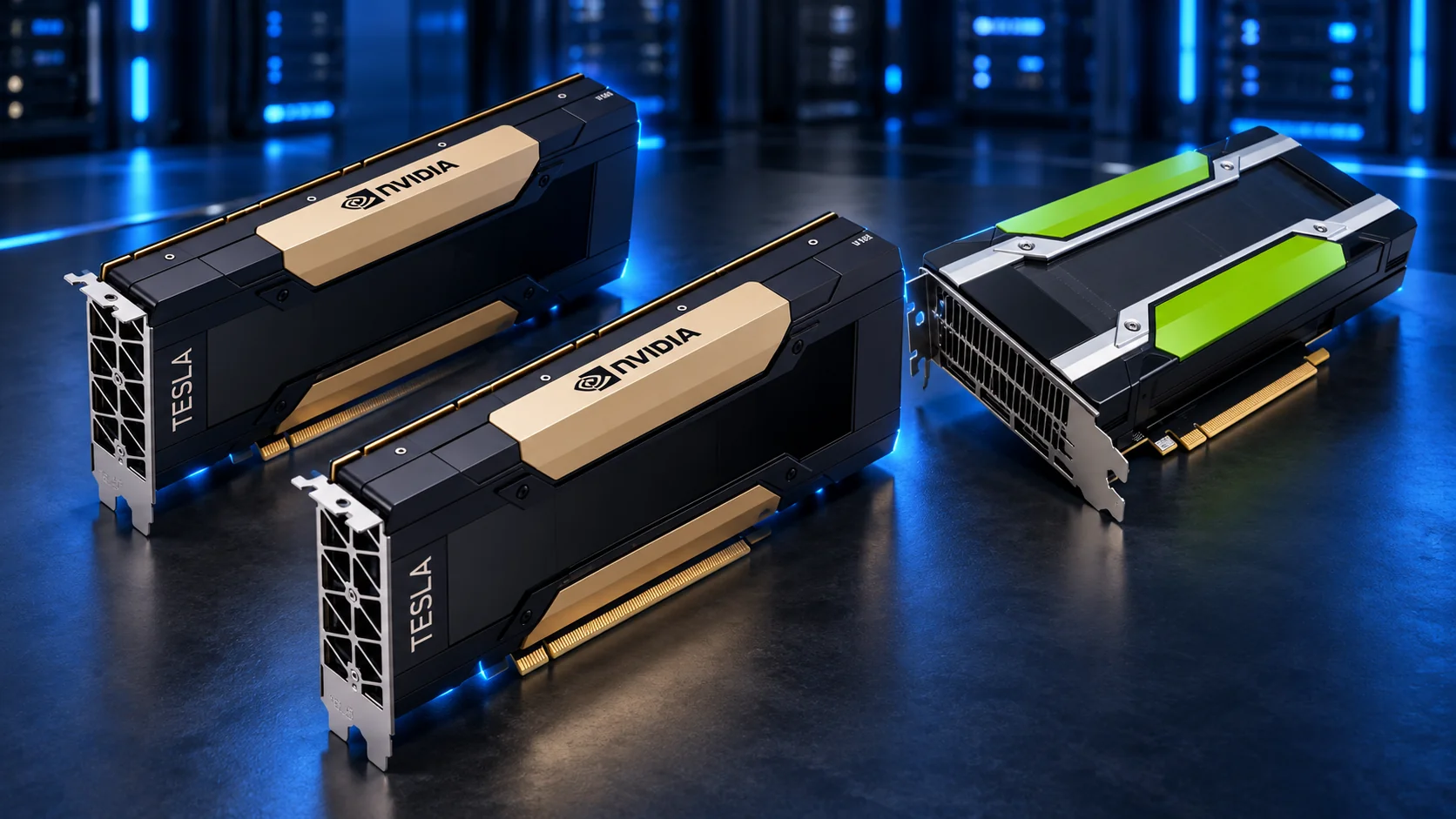
Running large language models locally doesn't necessarily require the latest NVIDIA GPU. Older data-center GPUs such as the Tesla V100 32GB, Tesla V100 16GB, and Tesla P40 24GB can still be useful for AI experimentation, private inference servers, and self-hosted language models.
But choosing between them isn't as simple as comparing VRAM.
A GPU with more memory doesn't automatically generate responses faster. Memory bandwidth, compute architecture, software compatibility, and model quantization all affect real-world performance.
In this guide, we'll compare these three NVIDIA GPUs, explain their strengths and limitations, and show you how to benchmark them for local LLM inference.
1. NVIDIA Tesla V100 vs P40: Specifications
Before looking at AI workloads, it's important to understand what makes these GPUs different.
| Specification | Tesla V100 32GB | Tesla V100 16GB | Tesla P40 24GB |
|---|---|---|---|
| Architecture | Volta | Volta | Pascal |
| GPU memory | 32GB HBM2 | 16GB HBM2 | 24GB GDDR5 |
| Memory bandwidth | 900 GB/s | 900 GB/s | 346 GB/s |
| CUDA cores | 5,120 | 5,120 | 3,840 |
| Tensor cores | 640 | 640 | None |
| FP32 performance (PCIe) | 14 TFLOPS | 14 TFLOPS | 12 TFLOPS |
| Compute capability | 7.0 | 7.0 | 6.1 |
| PCIe interface | PCIe 3.0 | PCIe 3.0 | PCIe 3.0 |
| Maximum board power | 250W | 250W | 250W |
Specifications refer to the PCIe versions of the Tesla V100. NVIDIA also produced SXM2 V100 modules with different power and interconnect characteristics.
The key difference: The V100 offers substantially higher memory bandwidth and dedicated Tensor Cores, while the P40 provides 24GB of memory for potentially running larger quantized models than a V100 16GB.
These architectural differences become important when running modern LLM inference engines.
2. Understanding GPU Performance for Local LLMs
When evaluating GPUs for language models, four factors deserve particular attention.
VRAM: How large a model can you run?
VRAM determines how much of a language model can remain inside GPU memory.
For example, a model containing 8 billion parameters requires approximately 16GB for its raw FP16 weights alone. Quantization can dramatically reduce that requirement.
This is why running quantized models using formats such as Q4 or Q5 is popular on older GPUs.
For local inference:
- 16GB VRAM: A practical starting point for smaller and mid-sized quantized LLMs.
- 24GB VRAM: Offers more space for larger models, contexts, and inference workloads.
- 32GB VRAM: Provides additional flexibility for larger quantized models and longer context windows.
Remember that model weights aren't the only memory requirement. Inference also uses memory for the KV cache, runtime buffers, and other operations.
Memory bandwidth: How quickly can data move?
Memory bandwidth is especially important during autoregressive token generation, where model weights must be accessed repeatedly.
The Tesla V100 provides up to 900 GB/s of HBM2 bandwidth, compared with 346 GB/s on the Tesla P40.
That gives the V100 a substantial theoretical advantage in memory-intensive operations.
However, higher bandwidth doesn't guarantee an equivalent increase in tokens per second. Actual speed depends on the model, quantization format, GPU kernels, and inference engine.
Tensor Cores: An important architectural advantage
The Tesla V100 includes 640 first-generation NVIDIA Tensor Cores, which can accelerate supported matrix operations, particularly in mixed-precision workloads.
The P40 has no Tensor Cores. Instead, it was designed for an earlier generation of inference workloads, including accelerated INT8 operations.
Although the P40's historical INT8 specifications are impressive, those figures should not be confused with performance running a modern 4-bit quantized language model.
For modern LLM inference, software implementation matters as much as theoretical GPU performance.
Software compatibility
Both GPUs are older architectures.
The V100 uses CUDA compute capability 7.0, while the P40 uses 6.1. NVIDIA's compatibility documentation lists CUDA 12.x as the final toolkit generation supporting both architectures, with the R580 driver branch as their final supported driver branch.
This is particularly important in 2026.
Not every new AI framework or prebuilt CUDA package will work on these GPUs. Check architecture support before selecting a runtime or upgrading your environment.
3. Which LLM Models Can Run on Each GPU?
One of the most common questions is: What size language model can I actually run?
The answer depends on quantization, context length, batch size, and whether the model is fully loaded into VRAM.
The following table provides a practical starting point for common dense language-model sizes using approximately 4-bit quantization.
| Model size | V100 16GB | P40 24GB | V100 32GB |
|---|---|---|---|
| 7B–8B Q4 | Suitable | Suitable | Suitable |
| 13B–14B Q4 | Usually suitable | Suitable | Suitable |
| 30B–32B Q4 | Generally too large for full GPU offload | Possible, memory-dependent | Generally suitable |
| 70B Q4 | Requires substantial CPU or multi-GPU offload | Requires substantial CPU or multi-GPU offload | Requires CPU or multi-GPU offload |
These are approximate capacity assessments, not verified benchmark results. Actual fit depends on the specific model architecture, quantization file, KV cache, and runtime overhead.
For example, a quantized 32B model may occupy roughly 18–23GB just for model weights, depending on its format. A 24GB P40 may accommodate some configurations but have limited memory remaining for context and runtime buffers.
A V100 32GB provides more headroom, making it a more flexible option for experimenting with larger models.
4. Tesla V100 32GB vs 16GB: Is More VRAM Faster?
A common misconception is that the V100 32GB must be twice as fast as the V100 16GB.
That isn't how GPU inference works.
For comparable PCIe models, the two cards share the same Volta architecture, CUDA Core count, Tensor Core count, and nominal memory bandwidth.
When running the same model with identical settings entirely on either GPU, performance may therefore be relatively similar.
The benefit of the 32GB version becomes more significant when a workload exceeds 16GB.
With additional memory, the larger V100 can:
- Run larger quantized language models entirely on the GPU.
- Support longer context windows when sufficient KV-cache memory is available.
- Reduce the need to offload model layers to system RAM.
- Provide additional memory headroom for certain batching and multi-request workloads.
Our assessment: The V100 32GB is the more flexible option for local LLM experimentation, while the 16GB version remains useful when your target models fit comfortably within its memory.
5. Tesla P40 24GB vs V100: Which Performs Better?
The Tesla P40 is an interesting GPU because it offers more VRAM than the V100 16GB, despite using the older Pascal architecture.
For workloads where the model cannot fit into 16GB but fits inside 24GB, the P40 may provide a practical advantage over the smaller V100 by avoiding some CPU offloading.
However, when both GPUs can fully load the same model, the V100's higher memory bandwidth and more capable mixed-precision hardware generally make it the stronger candidate for performance.
GPU performance comparison at a glance
| Use case | Preferred GPU |
|---|---|
| Small quantized LLMs | V100, generally |
| Larger models needing over 16GB | P40 or V100 32GB |
| Maximum single-GPU memory among these cards | V100 32GB |
| Mixed-precision AI compute | V100 |
| Entry-level 24GB budget builds | P40, if cost and compatibility justify it |
The P40 remains worth considering for projects where memory capacity and acquisition cost matter more than maximum inference speed.
But it shouldn't be treated as a direct replacement for newer inference accelerators.
6. How to Benchmark These GPUs for LLM Inference
Specifications provide useful context, but a fair benchmark requires actual measurements.
For reproducible results, we recommend using llama.cpp, which includes a dedicated benchmarking utility called llama-bench.
Step 1: Prepare the environment
Use a supported Linux environment, a compatible NVIDIA driver, and a CUDA toolchain that can compile for the GPU's compute capability.
For older Pascal and Volta hardware, compatibility checks are especially important.
After installation, verify that the GPU is detected:
nvidia-smiConfirm the GPU name, available memory, driver version, and power state.
Step 2: Select a common model
To make results comparable, every GPU must run the same model file and quantization.
A good starting point is a supported 7B–8B dense model using a Q4 GGUF file.
Avoid comparing one GPU running a 4-bit model with another running an 8-bit version. That would produce misleading results.
Step 3: Run llama-bench
With a compatible CUDA-enabled build of llama.cpp, run:
./build/bin/llama-bench \
  -m ./models/model-q4_k_m.gguf \
  -p 512 \
  -n 128 \
  -ngl 99 \
  -r 5
Replace the model path with the actual GGUF file. Ensure that the selected GPU has enough free memory for the intended offload configuration.
This benchmark measures prompt-processing and text-generation performance, reporting throughput in tokens per second.
Step 4: Collect additional measurements
For meaningful comparisons, record:
- Prompt processing (tokens/sec): How quickly the GPU processes incoming text.
- Token generation (tokens/sec): How quickly it generates new output tokens.
- VRAM usage: How much GPU memory the workload consumes.
- Power draw (watts): Electrical power consumed during execution.
- Context length: The amount of input history used during testing.
- Software versions: Driver, CUDA, llama.cpp commit, and model quantization.
Run repeated tests under comparable conditions. Also ensure adequate cooling, because thermal throttling can influence results.
Step 5: Record actual benchmark results
Use the following format for transparent reporting:
| GPU | Model | Prompt tok/s | Generation tok/s | Peak VRAM |
|---|---|---|---|---|
| V100 32GB | 8B Q4 | To be measured | To be measured | To be measured |
| V100 16GB | 8B Q4 | To be measured | To be measured | To be measured |
| P40 24GB | 8B Q4 | To be measured | To be measured | To be measured |
This table is a testing template, not a completed benchmark dataset. We recommend publishing actual numbers only when the hardware and configurations have been tested.
7. Building a Budget Local LLM Server
Beyond inference performance, there are several practical factors to consider when installing older Tesla GPUs in a workstation or server.
Cooling: Both the Tesla P40 and typical Tesla V100 data-center boards use passive cooling, relying on chassis airflow. Ordinary desktop case airflow may be insufficient.
Power: These PCIe cards have maximum board power ratings around 250W. The system must have a suitable PSU and the correct model-specific power connections.
Motherboard compatibility: Ensure that you purchase a PCIe card rather than an SXM2 module unless your server specifically supports SXM2.
RAM: Adequate system memory remains important when loading models or offloading layers to the CPU.
Operating system: Linux is a practical choice for building dedicated local inference servers, particularly when using llama.cpp and CUDA-based tools.
Finally, remember that older GPUs may require more software maintenance than newer architectures.
8. Final Verdict: Which GPU Should You Choose?
There is no single winner for every local AI workload.
| GPU | Best suited for |
|---|---|
| Tesla V100 32GB | Developers who want more VRAM, strong bandwidth, and flexibility for larger quantized LLMs |
| Tesla V100 16GB | Smaller and medium-sized models where 16GB is sufficient |
| Tesla P40 24GB | Budget-focused projects that prioritize affordable memory capacity and can accommodate older software compatibility requirements |
For many single-GPU local LLM builds, the Tesla V100 32GB is the strongest all-around option of these three, provided that its price and system requirements are reasonable.
The V100 16GB is still capable for smaller workloads. The P40 24GB can be useful when extra memory is worth trading for older compute architecture and potentially lower performance.
The best choice ultimately depends on your model, workload, electricity costs, hardware price, and software stack.
9. Frequently Asked Questions
Is the Tesla V100 32GB good for running LLMs in 2026?
Yes, for compatible workloads. Its 32GB HBM2 memory and high bandwidth make it useful for quantized language models and local AI experimentation. However, its age and limited support in newer CUDA software must be considered.
Is the Tesla P40 24GB better than the V100 16GB?
It depends. The P40 provides more memory, which may allow larger quantized models to run fully on the GPU. The V100 has stronger memory bandwidth and mixed-precision compute capabilities, which can improve performance for models that fit on both cards.
Can I run a 32B model on a Tesla P40?
Some 4-bit quantized 32B models may fit, depending on the model's actual memory footprint, context size, and runtime overhead. Check VRAM requirements before assuming full GPU offload is possible.
Does Tesla V100 support Ollama?
The V100's architecture is supported by some Ollama/CUDA configurations, but you should verify compatibility with your installed Ollama version, CUDA runtime, and NVIDIA driver. Support in a current binary should not be assumed.
Can I combine two Tesla V100 GPUs?
Yes, compatible inference frameworks can distribute model layers or tensors across multiple GPUs. However, two 32GB cards do not automatically behave like a single 64GB GPU, and performance depends on how the framework distributes computation and data.
Conclusion
The Tesla V100 32GB, Tesla V100 16GB, and Tesla P40 24GB demonstrate why VRAM capacity alone isn't enough to evaluate GPU performance for AI.
Understanding architecture, memory bandwidth, model quantization, and software compatibility helps you select hardware that fits your actual workload.
At Effecsa GPU, we focus on making GPU hardware, local LLM deployment, and AI infrastructure easier to understand through technical guides, transparent comparisons, and reproducible benchmarks.
Explore Effecsa GPU to learn more about AI hardware, local inference servers, and choosing the right GPU for your projects.
Technical References
1. NVIDIA Tesla V100 Official Datasheet 2. NVIDIA Tesla P40 Official Datasheet 3. NVIDIA CUDA Compute Capability — Legacy GPUs 4. NVIDIA CUDA Toolkit and Driver Compatibility Matrix 5. llama.cpp Benchmark Documentation
Updated October 2026. Specifications are manufacturer-published figures. Model compatibility assessments are illustrative and not substitutes for reproducible performance measurements.
Have a question about your AI infrastructure?
Talk to Our Experts
Get personal advice for your AI infrastructure.
Consult with Us →